Bundled workout guide
10-20-30 Running Workout
A 10-20-30 workout changes pace three times in every minute: easy, moderate, then fast. See the app’s three-set configuration and how to make a timer for it.
What is this workout?
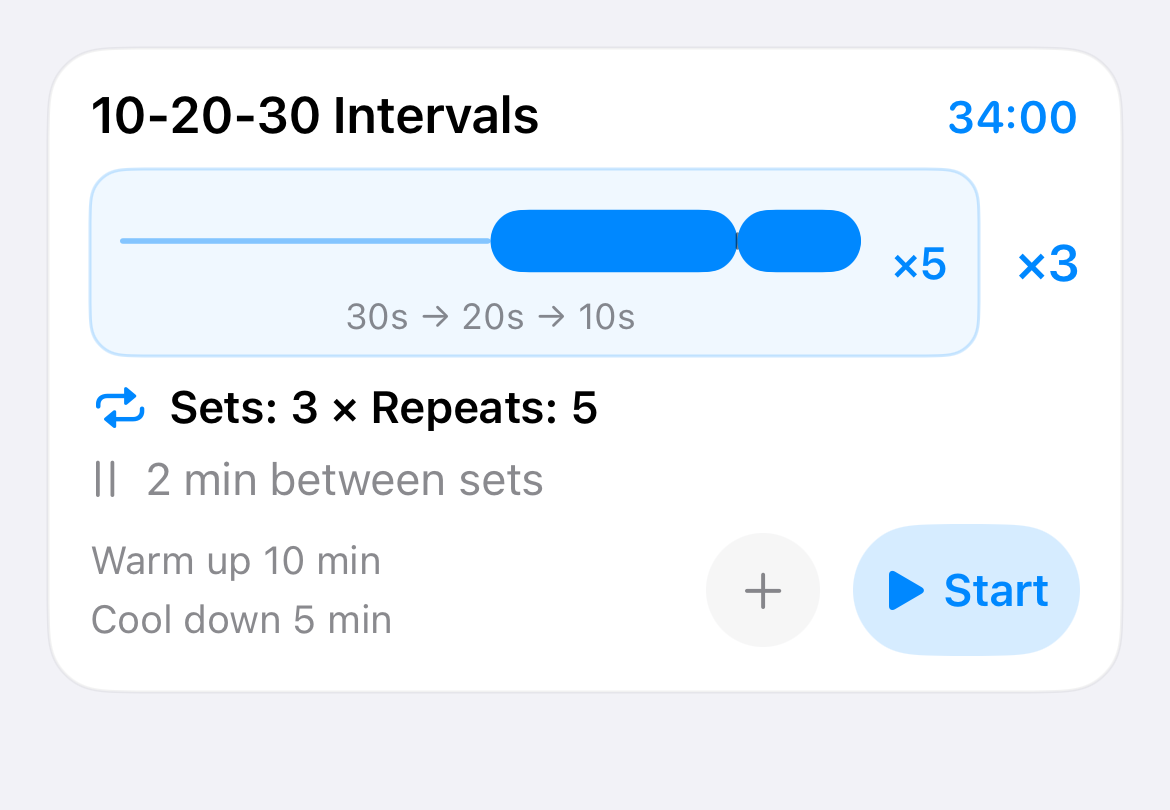
The name describes a one-minute cycle: 30 seconds easy, 20 seconds moderate, and 10 seconds fast. Interval Run groups five cycles into one block and uses three such blocks, with a two-minute easy recovery between blocks.
The Interval Run template takes 34 min in total, including its warm-up and cool-down. The timed steps below describe the bundled app configuration, not a personal training prescription.
Choose the workout and effort that fit your experience and training plan. Stop if something feels wrong; consult a qualified professional about health concerns.
The workout structure
Here is the exact sequence stored in the current Interval Run workout library.
| Part | Timing | How often |
|---|---|---|
| Warm-up | 10 min | Once |
| 10-20-30 block | 30 sec easy → 20 sec moderate → 10 sec fast | 5 cycles per block |
| Easy recovery | 2 min | Between the three blocks |
| Cool-down | 5 min | Once |
- 10 min warm-up
- 5 × 30–20–10
- 2 min easy
- 5 × 30–20–10
- 2 min easy
- 5 × 30–20–10
- 5 min cool-down
Total timer duration: 34 min.
See it in Interval Run
This is the actual bundled workout card, with the app’s own diagram and timing summary.
The full in-app workout library and advanced workout authoring require Interval Run Pro. With Pro, you can also use the advanced builder to make a timer with the same structure.
Set it up on iPhone and Apple Watch
- In the Workout Library, find 10-20-30 Intervals and review its steps.
- With Pro, start the bundled workout or create a workout with a 10-minute warm-up.
- Add a five-repeat block of 30 seconds easy, 20 seconds moderate, and 10 seconds fast. Repeat that block three times with two-minute easy intervals between blocks.
- Finish with a five-minute cool-down, then save and sync it to Apple Watch if desired.
After saving a workout on iPhone, sync it to Apple Watch to follow its timing without carrying your phone. Voice cues and haptics announce interval changes.
A detail to check before running
The “easy,” “moderate,” and “fast” labels are cues in the app. They do not set a pace automatically.
Use the timers as a guide to the structure; your training plan determines the effort and recovery that suit you.